Best 8mm Camcorder Tapes to Digital: Easy Transfers for Vintage Footage
Answer: These picks are designed to help you digitize 8mm, Digital8, and Hi8 tapes with confidence, whether you want a simple playback-transfer setup or a dedicated converter. The top choices are best for hobbyists, home movies, and collectors who want reliable transfers without specialized editing gear. Below is a concise, comparison-friendly guide to five strong options, followed by a practical buying guide and FAQs.
| Product | Type | Best For | Key Benefit |
|---|---|---|---|
| Sony Camcorder for 8mm Digital8 Hi8 | All-in-one transfer kit | Users who want a built-in playback and direct USB/DVD transfer | Includes power supply and AV/S-Video cables |
| Tech Collector 8mm/Hi8/Digital8 Transfer Bundle | Camcorder + USB adapter | Complete bundle for quick digitizing | Battery included; transfer to computer or DVD |
| 8mm Digital8 Hi8 Tape Player Nightshot CCD Handycam | Tape-player with USB | Direct-to-digital conversion with USB | Simple, nostalgic transfer option |
| ClearClick Video to Digital Converter 2.0 | Standalone converter | Direct digital capture without a computer | Records to USB drive or SD card; no PC required |
| Tech Collector Sharp 8mm Tape Player Camcorder | 8mm playback + USB | Budget-friendly 8mm playback and digitizing | Includes USB adapter and digitizing software |
Sony Camcorder for 8mm Digital8 Hi8 Tape Transfer to Computer USB and DVD
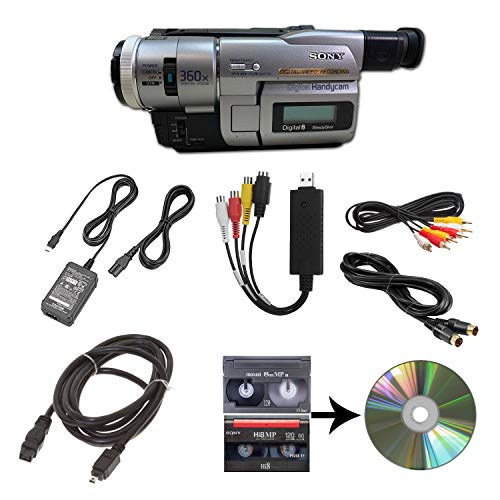
This all-in-one setup is suited for buyers who want a single device capable of playing 8mm, Video8, Hi8, and Digital8 tapes and transferring the content via USB to a computer or directly to DVD. It includes the camcorder, power supply, AV and S-Video cables for transfer or TV playback. Best for hobbyists who prefer a ready-to-use package with built-in playback and capture options.
Best for: Casual archivists who want a straightforward, single-source solution. Limitation: Requires an available USB connection and may rely on bundled software for editing or burning DVDs.
Tech Collector 8mm, Digital8, and Hi8 Transfer Bundle

This bundle is ideal for buyers who want a complete kit that covers 8mm, Hi8, and Digital8 formats. It typically includes a camcorder, USB capture device, and cables for easy transfer to computer files or burning to DVD. Best for: Users who value a bundled approach with a built-in transfer workflow. Caution: Ensure the USB capture device is compatible with your computer’s operating system.
8mm Digital8 Hi8 Tape Player Nightshot CCD Handycam Camcorder w/ Blank Tape
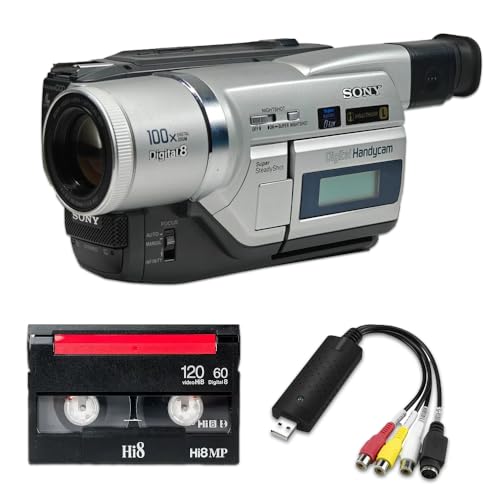
Designed for capturing vintage-style footage directly to tape, this option offers a nostalgic look and includes a USB adapter with tape digitizing software. Best for: Creators seeking a retro aesthetic with built-in USB capture. Caution: May require additional software for full digitization workflow on modern systems.
ClearClick Video to Digital Converter 2.0

This second-generation converter is a strong choice when you want to digitize tapes without a computer. It records directly to USB flash drives or SD cards and supports a range of inputs. Best for: Users who prefer a PC-free, direct-to-storage approach. Limitation: Requires working VCR or camcorder and tapes to play content for capture.
Tech Collector Sharp 8mm Tape Player Camcorder

This device targets budget-conscious buyers who want 8mm playback with USB support. It includes a USB adapter and digitizing software for a straightforward conversion path. Best for: Individuals digitizing a smaller number of 8mm tapes on a tight budget. Caution: Check software compatibility with your computer’s operating system.
Buying Guide: Key Considerations For 8mm Tapes To Digital
- Format compatibility: Identify whether your tapes are 8mm, Hi8, Digital8, or Video8. Some devices handle multiple formats, while others specialize in one.
- Transfer method: Decide between built-in playback with USB/DVD output, standalone converters with USB storage, or PC-based transfer. Each method affects simplicity and editing flexibility.
- Storage destination: If you prefer no PC, choose a converter that records to USB flash drive or SD card. If you want editing, ensure the kit supports reliable computer transfer.
- Software requirements: Some devices come with bundled software for digitizing or editing; verify compatibility with your computer’s OS.
- Power and cables: Look for kits with necessary power supplies and AV/S-Video cables for reliable playback and transfer.
- Reliability and format coverage: For mixed-format libraries, bundles that cover 8mm, Hi8, and Digital8 can simplify workflow and reduce gear clutter.
- Future-proofing: Consider devices that support common file formats (MP4, AVI) and allow easy cloud or external drive backups.
- Limitations: Some devices cannot play tapes independently and require an existing playback source. Check if worms gear is needed to initiate capture.
Frequently Asked Questions
- What is the simplest way to digitize 8mm tapes?
– Use an all-in-one transfer kit with built-in playback and USB/DVD output for straightforward, minimal setup. - Do any devices require a computer for digitizing?
– Some converters can record directly to USB or SD cards, while others require a PC connection for transfer and editing. - Can I digitize Hi8 and Digital8 tapes with the same device?
– Some kits support multiple formats (8mm, Hi8, Digital8). Verify format compatibility before purchase. - Is it better to use a standalone converter or a camcorder bundle?
– Standalone converters are convenient for PC-free transfers; camcorder bundles simplify setup for multiple formats.