Best 4K Cameras With HDMI Output for Professional Live Streaming and Conferencing
Answering the need for high‑quality HDMI output in a 4K camera, this guide highlights five reliable options ideal for classrooms, churches, conferences, and live streaming setups. Each pick targets different buyers—educators, event organizers, content creators, and IT managers—so you can choose based on tracking, zoom, and output options. Below, compare their strengths, best uses, and any limitations to help you decide quickly.
Summary of chosen products
| Product | Best For | Key Advantage | Note |
|---|---|---|---|
| iuZee 4K UHD PTZ Camera | Conference rooms, worship services | AI auto-tracking, 20x optical zoom | Integrated streaming via USB3.0/HDMI/LAN |
| TONGVEO 4K PTZ Camera | Education, houses of worship | 3x zoom, 92° wide view | Strong AI tracking |
| SVPRO 4K Streaming Webcam | PC setups, classrooms | Dual HDMI/USB outputs | 5–50mm lens, versatile zoom |
| ZIMOCE 4K 60FPS Camcorder | Vlogging, events | Dual lens with 21x zoom | Rotatable screen |
| IFWATER 4K HDMI USB Camera | Live teaching, webinars | 4x optical zoom, simultaneous HDMI/USB | Manual zoom lens |
iuZee 4K UHD PTZ Camera with AI Auto Tracking
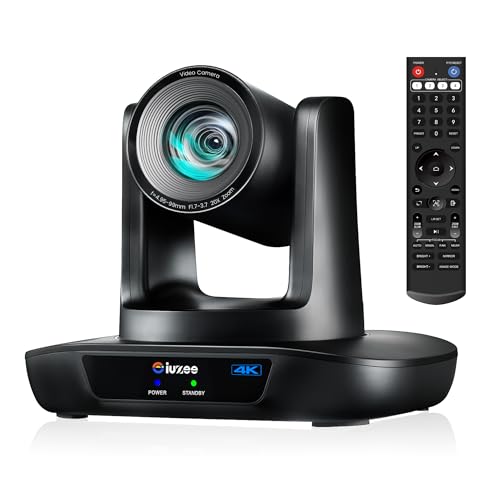
The iuZee 4K camera is designed for professional broadcasts and meeting rooms, offering AI auto-tracking and a 20x optical zoom. It supports USB3.0, HDMI, and LAN outputs for live streaming and IP streaming, with PoE for simplified power and data delivery. It uses a 1/2.8 inch 8.29 MP CMOS sensor and delivers 4K at 30fps with noise reduction for clearer images. Best for presenters and hybrid events where automatic framing and fast tracking matter most.
- Best for large rooms or lecture halls needing steady presenter focus.
- Better for environments where single-cable PoE is advantageous.
- Caution: No built‑in microphone; will need an external audio solution.
TONGVEO 4K PTZ Camera With AI Auto Tracking

The TONGVEO 4K PTZ camera emphasizes AI-based humanoid and face tracking with a 92° wide view and 3x optical zoom. It outputs 4K/30fps via HDMI 2.0 and USB 3.0, suitable for church services, classrooms, and conferences. It’s a strong pick when you need broad coverage plus precise tracking in a single device.
- Best for scenarios with multiple speakers and wide audience shots.
- Better for consistent AI framing in dynamic rooms.
- Caution: Slightly narrower zoom range than some 4K PTZs; may require strategic placement.
SVPRO 4K Streaming Webcam With Dual HDMI/USB Outputs

The SVPRO camera integrates a 4K/30fps capture with a 5–50mm zoom lens in a USB/HDMI dual-output format. It leverages a 1/2.8” IMX415 sensor for crisp imagery and provides flexible lens control for long-distance and close-up shots. This option is ideal for computer-based studios or classrooms needing easy PC integration with robust output options.
- Best for users who need straightforward USB video plus a secondary HDMI feed.
- Better for setups where quick plug-and-play with a computer is important.
- Caution: Optical zoom is 5–50mm, which may feel limited in very tight spaces.
ZIMOCE 4K 60FPS Dual-Lens Camcorder

This camcorder blends two lenses with a 21x zoom for broad scene capture and close-ups. It records at 4K/60fps and supports a rotatable screen, making it suitable for vlogging, live streams, and event coverage where versatility matters. It is chosen for users who want cinematic flexibility and a wide range of focal options in a compact form.
- Best for dynamic events where both wide and close shots are needed quickly.
- Better for creators who require a rotatable screen for self-recording.
- Caution: User interface and menus can be less intuitive for first-time users.
IFWATER 1080P HDMI Camera With 4K USB Output

The IFWATER camera provides HDMI and USB simultaneous output with a 2.8–12mm manual zoom lens, enabling 4K USB capture and 1080p HDMI streaming. It is well suited for educators and presenters who need reliable multi-output capability and hands-on lens control to fine-tune framing during live sessions.
- Best for classrooms and small to mid-size venues with shared displays.
- Better for users who want direct manual control over zoom and focus.
- Caution: The camera outputs 1080p via HDMI; 4K USB capture is achieved via USB rather than HDMI in many configurations.
Buying Guide: Key Considerations For Choosing A 4K Camera With HDMI Output
- Output requirements: Do you need HDMI only, USB, or both? Consider how you will record, stream, and display content.
- Zoom and field of view: Larger venues benefit from higher optical zoom; wider angles help capture more participants at once.
- Autofocus and tracking: AI tracking is valuable for dynamic speakers, but you may need manual controls for precise framing.
- Connectivity and power: PoE can simplify power and data in conference rooms; ensure your network and switch support it.
- Low-light performance: Look for cameras with good noise reduction and high-quality sensors if lighting is inconsistent.
- Setup complexity: Some devices are plug-and-play with minimal configuration; others offer advanced IP streaming and multi-output routing.
- Durability and deployment: PTZ cameras are designed for mounted installation; consider mounting options and cable management.
FAQ
Do these cameras support real-time streaming over the internet?
Yes, several models provide USB, HDMI, and LAN outputs suitable for live streaming and IP broadcast workflows.
Is AI tracking essential for a conference room setup?
AI tracking helps maintain presenter framing automatically, which can reduce operator workload in busy environments.
What is the typical best use for a dual-Output camera?
Dual USB and HDMI outputs enable simultaneous local display and computer capture for streaming and recording.
Can I use these cameras with common broadcasting software?
Many models are compatible with OBS, Zoom, Teams, YouTube, and similar platforms, especially those with HDMI and USB outputs.
Are there limitations with 4K over HDMI vs USB?
Some cameras output 4K over USB while delivering 1080p over HDMI, or vice versa. Check the specification for your preferred workflow.
Do these cameras require professional installation?
While some are plug-and-play, PTZ and dual-output models may benefit from professional mounting, cabling, and network setup in larger rooms.