Best 4K 60FPS Streaming Cameras for Modern Setups
As streaming and video calls demand crisp 4K detail and smooth motion, choosing the right camera matters. This guide highlights five top options that balance 4K resolution with 60 frames per second, robust autofocus, clear audio, and flexible mounting. Whether you’re streaming live commerce, gaming, or virtual meetings, these cameras deliver reliable performance across common platforms.
| Product | Brand | Resolution / FPS | Key Feature |
|---|---|---|---|
| SVPRO 4K 60fps Streaming Camera | SVPRO | 4K60 | HDMI & USB3.0, 4X optical zoom, CS mount |
| SVPRO 4K 60fps HDMI Camera | SVPRO | 4K60 | Dual HDMI/USB3.0 output, 5-50mm lens |
| EMEET C950 4K Webcam | EMEET | 4K30 / 1080P60 | PDAF autofocus, privacy cover |
| Galyimage 4K Ring Light Webcam | Galyimage | 4K30 / 1080P60 | Built-in ring light, TOF autofocus, dual mics |
| Angetube 4K AI Tracking Webcam | Angetube | 4K30 / 1080P60 | AI tracking, HDR, USB 3.0 |
SVPRO 4K 60fps Streaming Camera

The SVPRO 4K 60fps Streaming Camera delivers true 4K60 video through HDMI and USB3.0, supported by a 1/2.8″ IMX415 CMOS sensor for crisp details. Its 5-50mm telephoto lens provides up to 10x optical zoom, enabling close-ups from a distance or wide-shot framing as needed. The device supports multiple codecs (H.264, MJPEG, YUYV) for flexible streaming workflows, including OBS and professional broadcasts.
Designed for long-form live streams and high-quality recordings, the camera offers manual focus control and CS Mount versatility. While optimized for 4K60 output, it also accommodates 4K30 and 1080p60 via various software configurations. This model excels in live commerce, gaming, and production environments where precise framing and reliable color fidelity matter.
SVPRO 4K 60fps HDMI Camera

This SVPRO model emphasizes flexible two-output paths (HDMI and USB3.0) to support multi-camera setups or simultaneous capture to different software. It captures 4K at 60fps on compatible hardware, with a 5-50mm telephoto lens offering 10x optical zoom for long-distance shots and tight close-ups. The device promotes crisp motion handling and low-latency streaming, making it suitable for OBS-based productions, live broadcasts, and monitoring scenarios where rapid focus and stable framing are essential.
Equipped with a robust HDMI/USB bridge and a CS-mount-compatible lens system, this camera adapts to studio or field setups. The autofocus system and noise reduction features help maintain clear video in dynamic environments, while the privacy-friendly hardware design supports safe, professional streaming across Zoom, Teams, and other platforms.
EMEET C950 4K Webcam
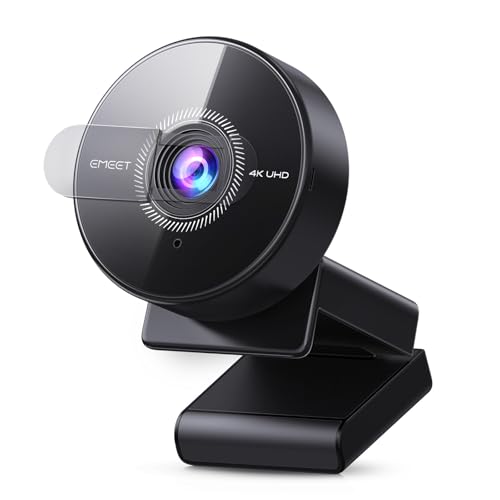
The EMEET C950 4K webcam delivers 4K UHD clarity with a CMOS sensor designed for enhanced low-light performance. It supports 4K at 30fps or 1080p at 60fps, making it versatile for meetings, online education, and streaming. PDAF autofocus provides faster, more precise focusing, while a built-in privacy cover helps safeguard your feed when not in use. A 70° FOV keeps you centered in the frame, and EMEETLINK software allows easy image adjustments and firmware updates.
The C950 also features a built-in noise-canceling microphone for clearer voice capture within typical office or home environments. Its USB 2.0 plug-and-play design simplifies setup across Zoom, Teams, Google Meet, and other conferencing platforms, making it a reliable all-around option for professional communication and streaming.
Galyimage 4K Ring Light Webcam

The Galyimage 4K webcam delivers 4K up to 30fps, along with a built-in ring light that offers three color temperatures for optimal skin tones in varying lighting. The touch-controlled brightness and color temperature ensure flexible fill lighting in dim or bright rooms. TOF autofocus helps lock onto moving subjects, while dual noise-canceling microphones reduce ambient noise for clearer conversations.
With a privacy cover and a flexible mounting approach, this webcam supports everyday conferencing and streaming needs. The combination of 4K image quality, smart lighting, and audio clarity makes it a practical option for remote work, online classes, and content creation that benefits from controlled lighting and a visible, well-lit picture.
Angetube 4K AI Tracking Webcam

The Angetube 913AI King 4K webcam combines 4K video capture with AI-based framing and tracking. It supports 4K at 30fps and 1080p at 60fps, ensuring smooth motion and reliable subject tracking during meetings or presentations. USB 3.0 enables fast data transfer, while HDR helps balance highlights and shadows for more natural-looking video. The camera is designed for remote meetings, streaming, and large virtual events where automatic framing can improve engagement and reduce manual camera tweaks.
Buying Guide
Key purchase considerations help determine which camera suits your setup best. Focus on resolution and frame rate, autofocus performance, audio quality, field of view, lighting, connectivity, and software compatibility. If true 4K at 60fps is essential, narrow your options to models explicitly delivering 4K60 streaming, then compare HDMI/USB outputs, lens versatility, and mounting options. For crowded desk setups, a camera with built-in lighting or a narrow FOV can reduce background distractions; for larger spaces, a wider FOV and optical zoom are advantageous.
- Resolution vs. frame rate: Some cameras offer 4K at 60fps, while others provide 4K at 30fps with 1080p at 60fps. Choose based on your streaming needs and bandwidth considerations.
- Autofocus and exposure: PDAF or advanced autofocus improves subject tracking; auto light correction helps maintain visibility in variable lighting.
- Audio quality: Built-in noise-canceling mics simplify setup, but consider external mics for maximum clarity in noisy environments.
- Field of view and lighting: A wider FOV captures more of the scene, but a ring light or HDR helps with skin tones and exposure balance.
- Connectivity and compatibility: USB3.0 or HDMI outputs affect latency and integration with OBS, Zoom, Teams, and other software.
- Privacy and mounting: A physical privacy shutter and flexible mounting options (desk, tripod, monitor mount) help protect privacy and fit different rigs.
- Firmware and support: Regular firmware updates and reliable warranty support contribute to long-term reliability in professional use.
In practice, match a camera’s strengths to your primary use case. For high-motion streaming or broadcast-style productions, prioritize true 4K60 and robust color fidelity. For daily meetings, prioritize autofocus, compact design, easy setup, and clear audio. If lighting is a concern, a model with built-in ring light or HDR can reduce post-production needs. Consider trying a model with software controls (like EMEETLINK or similar) to fine-tune image settings and firmware updates over time.