Best 360 VR Camera 4K Picks for Immersive Content
Answering the demand for true 360-degree, 4K VR footage, these models deliver high-resolution spherical video and reliable stabilization. The best buyers include content creators seeking back-to-back dual-camera setups, vloggers needing live framing, and hobbyists exploring immersive VR projects. Each pick below explains who it’s best for, why it stands out, and a clear limitation to consider.
| Product | Brand | Why it’s relevant | Best for |
|---|---|---|---|
| Kodak PIXPRO SP360 4K Dual Pro Pack VR Camera | KODAK | Back-to-back 360 capture with a complete mounting kit | 2-camera VR beginners and enthusiasts seeking a full starting kit |
| Insta360 X3-360 Action Camera | Insta360 | 5.7K 360 capture with 4K action capabilities and AI reframing | Vloggers and creators needing flexible post-production angles |
| EMEET PIXY Dual-Camera AI-Powered PTZ Camera 4K | EMEET | Dual-camera AI tracking with fast 0.2s focus | Professional livestreams and online teaching requiring precise framing |
| Kodak PIXPRO SP360 4K Premier Pack VR Camera | KODAK | Compact starter kit for 4K VR with wide lens | A first-time VR shooter optimizing ease and breadth of view |
| Insta360 X4 Standard Bundle | Insta360 | 8K capable 360 video with AI reframing and invisible selfie stick | Advanced creators focusing on ultra-high-resolution VR content |
Note: This article uses publicly listed product features to aid buyers in choosing a 360 VR camera. No warranties or performance claims are implied beyond the described specifications.
Kodak PIXPRO SP360 4K Dual Pro Pack VR Camera
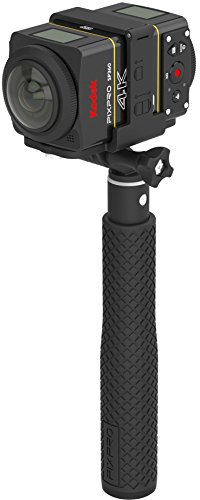
The Kodak SP360 4K Dual Pro Pack combines two SP360 4K cameras with a Dual Camera Base Mount for back-to-back spherical capture. It stitches to a true 360-by-360 view suitable for YouTube, Facebook, and VR headset playback. The bundle includes a complete mounting kit with an extendable selfie stick, suction cup mount, RF remote with wrist strap, remote clip, and lens covers. Best for creators who want a ready-to-shoot VR setup with both cameras working in harmony and a robust mounting ecosystem.
Best for: Home video studios and outdoor shooters needing a comprehensive, dual-camera VR solution without separate add-ons.
Caution: The quality of stitching and post-processing depends on supported platforms and software compatibility; ensure you have compatible software for best results.
Insta360 X3-360 Action Camera

The Insta360 X3 blends 5.7K 360 capture with 4K single-lens action camera capabilities and FlowState stabilization. It features a 2.29″ touchscreen and AI editing through the Insta360 app for reframing after capture. This model is ideal for creators who want flexible post-production angles and robust stabilization in dynamic environments like motorsports and winter sports.
Best for: Content creators who need high-resolution 360 footage with post-production flexibility and on-device controls.
Caution: Some accessories listed with the box are optional or region-specific; verify what’s included in your region before purchase.
EMEET PIXY Dual-Camera AI-Powered PTZ Camera 4K

EMEET PIXY features a dual-camera AI system with PDAF focus and an ultra-fast 0.2-second focus, plus a 1/2.55″ Sony sensor and three mics for improved audio. Its AI tracking uses a 3-chip setup for smoother framing with 310° pan and 180° tilt. It’s designed for streaming, online teaching, and professional meetings where automatic subject tracking adds value.
Best for: Live streaming and online classrooms needing reliable auto-framing and fast autofocus with stable 4K output.
Caution: The product relies on software control (EMEET STUDIO); ensure compatibility with your operating system and streaming setup before buying.
Kodak PIXPRO SP360 4K Premier Pack VR Camera

The SP360 4K Premier Pack provides a complete starter kit with the SP360 4K camera, frame housing, bar mount, suction cup, adhesive mounts, and lens covers. It records 4K UHD video with a 12 MP BSI-CMOS sensor at 30 fps and 2880 by 2880 circular VR footage. The 235-degree fixed ultra-wide lens captures a full hemisphere in a single shot, ideal for VR experiences.
Best for: Beginners seeking a self-contained VR package that emphasizes simplicity and a broad field of view.
Caution: The fixed lens limits focusing flexibility; plan content that benefits from a wide, hemispherical capture in one frame.
Samsung Gear 360 Real 360° High Resolution VR Camera
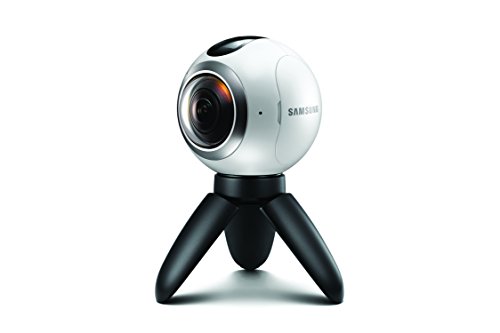
This compact 360-degree camera records full 360-degree videos and 180-degree shots with a 4K-capable setup and dual 180-degree lenses. It emphasizes portability and straightforward capture, with a dust- and water-resistance-oriented design. It’s suitable for quick VR projects and on-the-go content creation, though it may be outpaced by newer stabilization features in newer models.
Best for: Travelers and vloggers seeking a portable 360 camera with dependable 4K capture in casual environments.
Caution: Limited newer software features may require external editing tools for advanced VR workflows.
Insta360 X4 Standard Bundle

The Insta360 X4 offers 8K 360 video capability (or 5.7K at 60fps) with HDR and an AI-powered reframing workflow. The package includes features such as an invisible selfie stick effect and removable lens guards to help protect the camera in challenging environments. It’s well-suited for creators pursuing ultra-high-resolution VR storytelling and post-production flexibility.
Best for: Advanced users aiming for the highest-resolution 360 footage with post-production reframing and protection features.
Caution: The “invisible selfie stick” effect is a post-processing trick; plan content accordingly and confirm what is included in your bundle beyond the core camera body.
Buying Guide
What to consider when choosing a 360 VR camera for 4K:
- Field of view and lens configuration: Dual cameras provide seamless 360-by-360 capture but require stitching software. A single-lens 360 camera can be simpler but may need movement to cover angles.
- Resolution and frame rate: Higher resolutions (5.7K, 8K) deliver crisper footage, especially for larger displays or VR headsets. Check supported frame rates for smooth motion.
- Stabilization and AI features: FlowState or similar stabilization helps reduce shake. AI tracking and reframing improve post-production flexibility, especially for live streams or dynamic scenes.
- Portability and accessories: Bundles with mounts, remote controls, and protective housings save setup time and expand shooting scenarios.
- Post-production workflow: Ensure compatibility with your editing software and available apps for stitching, reframing, and exporting VR content.
- Storage and battery life: 4K and 8K footage consume substantial storage. Consider battery life for longer shoots and whether the device supports expandable storage.
Frequently Asked Questions
- What is 360 VR video in 4K best used for?
The format shines in immersive storytelling, virtual tours, and interactive marketing where viewers can look around a scene. - Do 360 cameras require stitching?
Many dual-camera systems stitch automatically or via companion software, but some require manual alignment. - Is 8K 360 worth it for beginners?
For most beginners, 4K with good stabilization and post-processing is more practical; 8K is best for advanced creators with powerful computers. - Which accessory matters most for outdoor use?
Protective housings, lens guards, and weather-resistant design help maintain image quality in challenging conditions. - Can I use a 360 camera for live streaming?
Yes, many models support live streaming with compatible software and apps, enabling real-time VR broadcasts. - Do I need a PC or smartphone to edit 360 videos?
Most workflows require a computer for stitching and advanced editing, though mobile apps handle basic reframing and export.