The following picks are top 360-degree HD cameras designed for modern homes, classrooms, and small to medium offices. Each option offers a wide field of view, crisp video, and clear audio, with features like AI framing, built-in microphones, and easy plug-and-play setup. Whether you’re hosting hybrid meetings, streaming content, or teaching online, these cameras help you capture every angle and sound with minimal fuss. Below you’ll find a quick comparison table, followed by in-depth profiles of five standout 360-degree cameras.
| Product | Brand | Key Strength |
|---|---|---|
| Owl Labs Meeting Owl 3 | Owl Labs | 360° room view, speaker tracking, 18 ft mic pickup |
| j5create JVCU360 | j5create | Omnidirectional mic, six display modes, 1080p |
| Lenovo Essential 1080p Webcam | Lenovo | Ultra-wide 95° lens, dual mics, 360° rotation |
| TOUCAN 360° Conference Camera | TOUCAN | 360° omni-directional, AI tracking, 1080p, noise reduction |
| QEBIDUM 360° Computer Camera | QEBIDUM | Full HD 1080p, 360° wide angle, autofocus, 30fps |
Owl Labs Meeting Owl 3

The Owl Labs Meeting Owl 3 integrates a complete 360-degree camera with room-wide audio to support dynamic hybrid gatherings. It streams 1080p video in all directions, while its 360° microphone array captures voices across the room, helping remote participants feel engaged. The device uses an intelligent tracking system that focuses on speakers, reducing the need for manual camera control. Setup is rapid and typically requires a single USB connection to a computer, with management through common collaboration platforms. It’s especially suited for small to mid-sized conference rooms that value a simple, all-in-one solution.
In practice, Meeting Owl 3 delivers a seamless conferencing experience by combining panoramic video with audio pickup that reaches across a room up to approximately 18 feet. The single-device design minimizes clutter and simplifies IT administration, making it a practical choice for education spaces, executives’ offices, and coworking environments. For users who want a turnkey option that reduces the complexity of hybrid meetings, this model stands out for reliability and ease of use.
Key strengths include effortless installation, strong audio fidelity, and intuitive remote participation. The camera supports standard USB connectivity and is compatible with leading platforms like Zoom, Google Meet, and Microsoft Teams. While its focal point is collaboration, it also serves well for streaming and content demonstrations where a broad, immersive view matters more than high optical zoom. If you prioritize an all-in-one system with hands-off framing and clear speech pickup, Meeting Owl 3 is a leading choice.
j5create JVCU360 360° Webcam
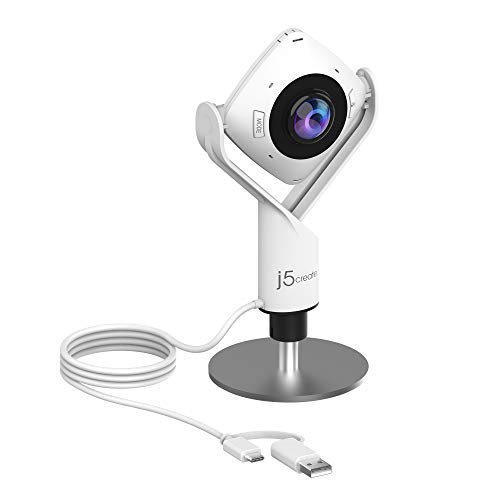
The j5create JVCU360 is a compact 360-degree conferencing webcam designed for flexible viewing angles and easy setup. It features a built-in omnidirectional microphone that captures voices from around the room, helping participants hear and be heard clearly during meetings. With six display modes, you can tailor the camera’s output to different room layouts, ensuring the best possible view whether you’re presenting, collaborating, or teaching online. The device streams at Full HD 1080p (30 Hz), delivering sharp video that’s well-suited for many business, classroom, and home-office scenarios.
Key considerations include its USB-C connectivity, which supports modern laptops and desktops, and its plug-and-play operation that minimizes IT overhead. The wide field of view helps maintain eye contact and presence when participants are spread out, while the microphone’s placement helps reduce rumble and ambient noise. For users who want a versatile, cost-effective 360° webcam without extra software, JVCU360 provides reliable performance and straightforward control for everyday video calls and online classes.
Lenovo Essential 1080p Webcam

Lenovo’s Essential 1080p Webcam emphasizes simplicity and reliability with a broad 95-degree field of view and dual built-in microphones. The plug-and-play USB 2.0 interface makes setup quick on Windows or Mac devices, and the camera’s tilt and 360-degree rotation provide flexible mounting options. This model is ideal for users who want steady, dependable video for daily meetings or streaming without needing extra drivers. The privacy shutter adds a practical layer of security when the camera is not in use, a valuable feature for home offices and classrooms alike.
Performance notes include smooth 1080p video at 30 frames per second and straightforward compatibility with major conferencing platforms. The two mics deliver balanced audio from multiple directions, which is helpful in larger rooms or when the speaker moves around. Lenovo’s webcam is well-suited for teachers, students, and professionals who want a no-fuss, solid-performing camera that integrates easily into existing setups.
TOUCAN 360° Conference Camera
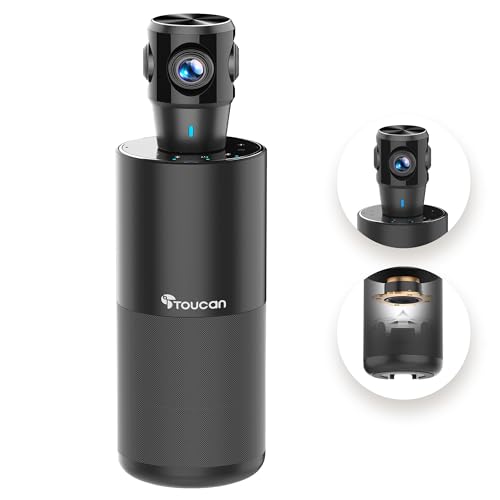
TOUCAN’s 360-Degree Conference Camera combines full-room coverage with AI-assisted tracking to help remote participants stay oriented during meetings. The camera captures at 1080p with a multi-microphone array that reduces ambient noise and preserves vocal clarity. Its omni-directional field of view ensures everyone stays on camera, even as presenters move around or as the room layout changes. Plug-and-play USB connectivity makes it compatible with Zoom, Google Meet, and Microsoft Teams, minimizing setup time for both classrooms and office spaces.
Real-world usage benefits include improved engagement in hybrid teams and more natural group discussions, since the camera continually frames the active speaker and nearby participants. The device’s design emphasizes simplicity and reliability, making it a practical choice for conference rooms, small training spaces, and home offices that require a single, capable camera that can handle frequent movement and multiple speakers.
Considerations include evaluating room size to determine if 360° coverage meets your needs or if a larger sensor would add extra detail in larger environments. The model’s integrated microphones and AI framing provide an effective all-in-one solution, reducing the need for additional peripherals.
QEBIDUM 360° Computer Camera

The QEBIDUM 360° Computer Camera offers full HD 1080p video with a wide 360-degree field of view and autofocus for consistent sharpness. Its built-in dual microphone array supports clear, natural-sounding voice capture, even when multiple participants are speaking from different angles. The camera’s 100-degree wide-angle lens complements the 360° coverage, helping to keep all participants visible in 16:9 framing. A 30fps refresh rate provides smooth video for routine video calls and live streaming, while USB connectivity ensures broad compatibility with most computers and conferencing platforms.
Practical deployment considerations include room placement to maximize the panoramic view, testing microphone pickup distance, and ensuring power supply stability for continuous use. The autofocus and light correction features help maintain quality under varying lighting conditions, making this a strong option for home offices, small studios, and classrooms where a simple, reliable 360° webcam is needed without extra software requirements.
Buying Guide
Key Purchase Considerations
- Field of View and Resolution: Decide between true 360° coverage versus enhanced focal length for larger rooms. Balance video resolution (1080p or higher) with frame rate for smooth streaming and calls.
- Audio Quality: Look for built-in microphones with noise reduction and echo cancellation. For larger rooms, consider models with multi-microphone arrays to capture voices from all directions.
- Framing and Tracking: AI tracking or speaker-framing features help keep the active speaker centered. If you frequently switch between presenters, a camera with reliable auto-framing can reduce manual adjustments.
- Platform Compatibility: Confirm compatibility with Zoom, Microsoft Teams, Google Meet, and other tools you use. USB-based devices typically offer broad support without extra software.
- Connectivity and Power: USB-C is common on newer devices; USB-A remains widely compatible. Check whether the camera powers via USB or requires an external adapter.
- Mounting and Setup: Consider desk placement, tripod compatibility, and whether you need a privacy shutter. Plug-and-play models save IT time, especially in schools and offices.
- Privacy and Security: Look for built-in privacy shutters and straightforward firmware updates to protect against vulnerabilities.
- Room Suitability: 360° cameras excel in smaller to mid-size spaces. For larger rooms, consider additional cameras or a model with higher-quality tracking to maintain engagement across participants.
- Cost-to-Value: Compare feature sets against price. A slightly higher investment in a camera with AI tracking and robust audio can reduce the need for extra equipment later on.
What Sets These Cameras Apart
- All five options provide true 360-degree coverage and HD video, suitable for remote collaboration and instruction.
- Audio performance varies: some models emphasize omnidirectional mics and noise reduction, while others pair well with external audio setups.
- AI framing and speaker tracking are present in several models, which helps maintain engagement in hybrid meetings.
- Compatibility with common video platforms is strong across the list, minimizing compatibility issues for mixed-device environments.
- Mounting flexibility and ease of setup are practical advantages for classrooms, home offices, and small conference rooms.
Comparison Snapshot
- Best for all-in-one simplicity: Owl Labs Meeting Owl 3 — strong tracking, easy setup, wide room view.
- Best for flexible room layouts: j5create JVCU360 — multiple display modes and handy omnidirectional mic.
- Best value with broad support: Lenovo Essential 1080p — reliable, budget-friendly, 360° rotation.
- Best AI framing and tracking: TOUCAN 360° Conference Camera — strong video, integrated AI framing.
- Best budget 360° option: QEBIDUM 360° Computer Camera — solid 1080p with autofocus and wide view.