Best 360 Degree Camera Smartphone Solutions for Clear, Immersive Imaging
Looking for a 360 degree camera smartphone experience that covers both portable on-the-go shooting and online collaboration? This guide highlights five top 360-degree camera options that pair well with smartphones, catering to creators, streamers, and remote workers. Each pick is evaluated for who it’s best for, why it stands out, and practical limitations you should know.
Summary Table (Top Picks)
- Ricoh Theta V: Best for high-quality standalone 360 video and audio.
- j5create 360 Degree Meeting Webcam: Best for video conferencing from a laptop or desktop.
- RICOH THETA X Bundle: Best for serious 360 capture with extra accessories.
- PANOCORE360 All-in-One Meeting Camera: Best for small-to-medium hybrid meetings.
- AKASO 360 Action Camera Combo: Best for action-packed adventures and stable 360 footage.
Ricoh Theta V 4k 360 Spherical Camera

- Key features: 4K 360 video at 30 fps (3840 x 1920), H.264 video, Hi-res stills, 4-channel mic for spatial audio, improved exposure and white balance with a new processor.
- Best for: Photographers and videographers who want high-quality, standalone 360 capture with robust audio and advanced image processing.
- Why selected: Strong balance of video resolution, real-time exposure control, and immersive audio—ideal for immersive storytelling and professional-quality footage without extra rigs.
- Caution: Requires compatible workflow for editing 4K spherical video; integration with mobile apps may be limited compared to newer models.
j5create 360 Degree All Around Meeting Webcam

- Key features: 360° video conferencing with built-in omnidirectional microphone; six display modes; Full HD 1080p at 30 Hz.
- Best for: Remote workers and educators who need a full-room view and straightforward setup with a computer.
- Why selected: Combines wide-angle coverage with a practical mic array, making it suitable for group calls, online classes, and collaborative sessions.
- Caution: Capabilities are tied to computer-based conferencing platforms; may not be ideal for pure mobile phone use without a PC.
RICOH THETA X 360-Degree Camera Bundle
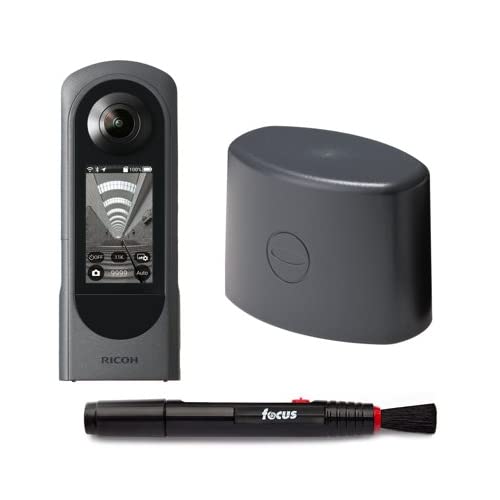
- Key features: Theta X 360 camera with lens cap and cleaning pen; up to approximately 60MP stills (11008 x 5504), high-precision stitching, supports external memory cards.
- Best for: Serious 360 photographers and videographers who want advanced stitching quality and a bundled accessory kit.
- Why selected: The bundle adds essential accessories and expands memory options, enhancing long-form shooting and field use.
- Caution: Data handling and post-processing workflows can be more involved for beginners.
PANOCORE360 All-in-One Meeting Camera

- Key features: Four integrated cameras, microphones, and speakers; 4K capture merged to a 1080p output; adaptive dual vision modes; optimized for small to medium meeting rooms.
- Best for: Hybrid workspaces that need a compact, all-in-one device to manage in-room and remote participants.
- Why selected: The system-level integration reduces setup complexity while delivering clear visuals and room context for meetings.
- Caution: The output is 1080p, which may be a trade-off for users seeking true 4K streaming in a single device setup.
AKASO 360 Action Camera Motorcycle Combo
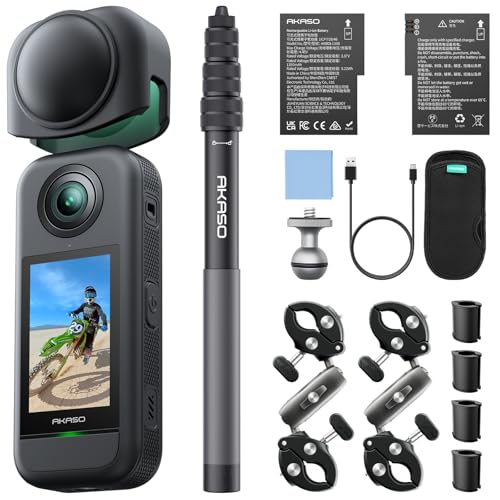
- Key features: 5.7K 360° video; 360° portrait and landscape modes; 360-SuperSmooth stabilization; Horizon Lock and AI tracking.
- Best for: Adventure-driven users who want high-resolution 360 footage with reliable stabilization on the move.
- Why selected: Combines high-end video quality with stabilization features that compensate for motion and vibrations in dynamic scenes.
- Caution: Higher resolution video can demand more storage and processing resources for editing and playback.
Buying Guide: 360 Degree Cameras for Smartphone Use
What should you consider when choosing a 360 degree camera for smartphone use? Here are practical factors and contextual questions to guide your decision.
- Purpose: Are you streaming meetings, capturing immersive travel footage, or producing creative clips for social media? Choose a model aligned with your primary use case (meetings, action, standalone 360 capture).
- Video Resolution and Stitching: Higher resolutions require more storage and processing power. Look for native 4K or near-4K capture and reliable stitching to avoid seams.
- Audio Quality: Spatial or omnidirectional audio is important for immersive footage. If sound is critical, favor models with multi-mic setups or robust audio processing.
- Mobility and Setup: Do you need a compact, portable device, or an all-in-one meeting camera? Consider whether you need accessories like mounts, memory cards, or a tripod.
- Compatibility: Check how the device pairs with smartphones, PCs, or dedicated apps. Some devices excel as standalone cams, others integrate easily with conferencing software.
- Stabilization: For action capture, stabilization features such as horizon locks or AI tracking help produce smoother footage during movement.
- Storage and Memory: External memory support and onboard storage affect your ability to shoot longer sessions without interruptions.
- Price-to-Performance: Balance the cost against features like stabilization, field of view, and post-processing capabilities to find the best value.
Frequently Asked Questions
- What is a 360 degree camera smartphone?
A 360 degree camera captures a full spherical view that can be combined into a single immersive video or image, often used with smartphones for editing, sharing, or live streaming. - Do I need a special app to use these cameras?
Many devices include companion apps, but some work as standalone cameras. Check compatibility with your phone or computer before purchasing. - Is 4K 360 video necessary for everyday use?
4K provides higher detail, but for casual sharing or conferencing, 1080p or lower can be sufficient and more storage-friendly. - Can I use these cameras for live streaming?
Some models support live streaming via compatible software or apps; verify the device’s output format and platform compatibility. - Do these cameras work with both iPhone and Android?
Many models are platform-agnostic, but always confirm device compatibility with your specific phone and operating system. - What’s the best option for meetings?
For meetings, a 360-degree webcam with a built-in mic, like the j5create model or PANOCORE with room integration, offers a straightforward, ready-to-use solution.