Best 35mm Slides to JPEG Solutions for Easy Digital Archiving
If you want to convert 35mm slides and negatives into readily shareable JPEG files, you need a fast, user-friendly film scanner. This guide compares five reliable options to help you pick the right tool for your needs—whether you’re a casual memories keeper, a hobbyist archivist, or coordinating office digitization. The top picks cater to different workflows: standalone portability, larger built-in displays, or easy smartphone sharing. The buyer table below highlights key distinctions to help you decide quickly.
| Product | Best For | Key Benefit |
|---|---|---|
| KODAK Slide N SCAN | Older photo collections with multiple film formats | 5” LCD, fast feed, multiple adapters |
| KODAK SCANZA Digital Film & Slide Scanner | Comprehensive 35mm to 8mm needs | 3.5” LCD, multiple inserts, quick one-touch |
| DigitConvert 35mm Film Scanner | Standalone, compact desktop use | 2.4” LCD, easy-load adapters |
| DIGITNOW! 135 Film Negative Scanner | Budget-friendly quick digitization | Adjustable rapid slide feeder, SD card save |
| DigitConvert Mobile Film Scanner | Phone-based sharing and quick digitization | Smartphone app integration, portable |
KODAK Slide N SCAN Film & Slide Scanner

The KODAK Slide N SCAN is a versatile, standalone film scanner designed to digitize 135, 110, and 126 film formats, including color and black-and-white negatives and slides. It features a 5” LCD display for direct viewing and editing, and it saves to an SD card (not included). This model is best for collectors who want a broad format range and a built-in preview screen for quick workflows. A 50mm slide holder and adapters are included for fast, continuous loading. Best for readers with mixed-format archives, who appreciate an on-device gallery with direct viewing. Caution: SD card not included, so you’ll need to provide compatible storage to save files.
Why it’s selected
- Supports 135, 110, and 126 formats, plus 50mm slides
- 5” LCD for in-device review and editing
- Quick-load tray enables faster scanning cycles
35mm Film & Slide Scanner With 2.4″ LCD

This standalone scanner converts 135 negatives and slides directly to JPEG on-device, without a computer. The 2.4” LCD allows immediate preview, and the unit supports positive, negative, and black-and-white modes for archiving 35mm film. It includes a fast-loading slide feeder, making it well-suited for large collections. Best for home archivists who want a simple, PC-free workflow. Limitation: Large batch processing is dependent on the feeder’s capacity and may require extra adapters for certain slide thicknesses.
Key points
- No PC required for basic scanning
- Includes adapters for quick loading
- Supports large batches via rapid feeder
DIGITNOW! 135 Film Negative Scanner

The DIGITNOW scanner emphasizes a straightforward, no-computer setup with an adjustable rapid slide feeder. It digitizes 35mm film and slides to JPEG on an SD card or computer, supporting up to 1800 DPI. It’s a practical choice for budget-conscious users who want a simple, stand-alone device. Best for budget-friendly digitization and those who prefer physical media transfer. Caution: It’s less feature-rich in on-device editing compared to higher-end models.
Practical notes
- Standalone operation with SD card storage
- 1800 DPI resolution suitable for family archives
- USB connection for optional computer transfer
35mm Film Scanner & Slide Scanner With 2.4″ LCD

This DigitConvert model is designed as a compact, standalone digitizer with a built-in 2.4” LCD for on-device preview and editing. It supports 35mm and 135 film with easy-load adapters for fast scanning. It operates without a PC, saving files directly to an SD card (up to 128GB). This is a strong pick for seniors and casual users who want a simple, all-in-one solution. Better for small collections or single-session digitization; limitation: no internal memory beyond the SD card, so storage planning matters.
Highlights
- One-click scanning and direct SD saving
- Adjustable brightness and color correction
- Batch-friendly with fast-loading adapters
Mobile Film Scanner For 35mm Slides & Negatives
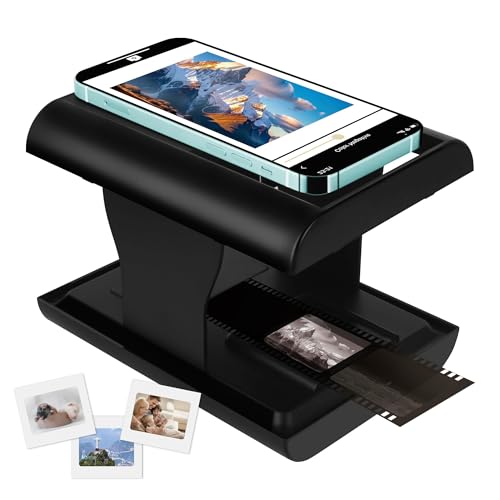
This DGODRT device focuses on smartphone-based digitization. It converts 35mm slides and negatives to JPEGs stored on your phone and supports editing and sharing via a dedicated app. It’s best for on-the-go archiving and quick sharing with family. Choose this if you want mobile convenience and easy social sharing. Caution: app-dependent workflow can vary by phone model and OS version.
Why choose a mobile-oriented option?
- Instant transfer to a phone for quick sharing
- Portability for travel or event digitization
- Accessible app-based editing before saving
Buying Guide: 35mm Slides To JPEG — Key Considerations
- Who is the scanner for? Decide between PC-free simplicity, on-device editing, or full PC workflow. Standalone models are great for casual users; devices with larger displays suit archival projects.
- What formats do you need to scan? If you have 35mm, plus 126 and 110 formats, choose a model with broad compatibility. If you only have 35mm, a simpler option may suffice.
- Display size and editing: Larger LCDs (3.5” or more) help with color correction and previewing before saving your JPEGs.
- Storage and transfer: Confirm SD card capacity, and whether the device writes directly to a card or via a computer/phone.
- Feeder design: A fast, reliable feeder reduces manual handling and batch time. Check whether different slide adapters are included for convenience.
- Resolution: Higher DPI generally yields sharper JPEGs; however, practical results depend on source quality and output needs.
- Portability: For travel or family events, a compact mobile scanner may be preferred over a bulkier desktop unit.
Common scenarios and recommendations
- Casual archiving at home: KODAK Slide N SCAN or Kodak SCANZA provide built-in displays and broad format support.
- Small business or office archiving: A model with quick-load feeders and reliable SD storage, like the DIGITNOW! scanner, helps process larger batches.
- Mobile sharing and on-the-go digitization: A smartphone-connected option, such as the Mobile Film Scanner, fits quick transfer workflows.
FAQ
- Can I scan 35mm slides without a computer? Yes, several models offer standalone operation with on-device displays.
- What resolution should I expect? Most devices provide JPEG outputs around 14–22MP, depending on the model and source.
- Do these scanners require special software? Most are plug-and-play or use a built-in app; some need basic software on a PC for transfers.
- Will all slides fit in the feeder? Most feeders handle standard 35mm slides; thick mounts or oversized frames may require alternative adapters.
- Is a separate SD card needed? Yes, several models save directly to SD cards; you’ll need compatible storage in many cases.
- Can I convert color and black-and-white negatives? Many models support both modes; check the device’s listed capabilities for the exact formats.