Best 21.5-Inch Digital Photo Frames for Family Memories
Answering the search for large, easy-to-use digital frames, these 21.5-inch models deliver clear Full HD displays, simple sharing, and flexible storage. They’re ideal for tech-friendly households seeking wide viewing angles, remote sharing from loved ones, and straightforward operation for seniors or busy families. The top picks below highlight frames best for remote memories, wall-mounted setups, and photo-driven storytelling.
The following table summarizes five strong options for a 21.5-inch digital photo frame, focusing on who they’re best for and what makes each stand out. Use this as a quick-guide before diving into individual product details.
| Product | Best For | Key Strength |
|---|---|---|
| BIGASUO 21.5″ Frameo Frame | ||
| FANGOR 21.5″ No-Touch Screen | ||
| Dragon Touch 21.5″ Frame | ||
| BSIMB 21.5″ Touchscreen Frame | ||
| FULLJA 21.5″ Pro Frame |
BIGASUO 21.5-Inch Frameo Digital Photo Frame

Best for families who value private, real-time sharing with a trusted app ecosystem. This 21.5-inch frame uses a Frameo-enabled experience that connects to a home network via 2.4GHz or 5GHz WiFi, supporting photo and video sharing from loved ones. The Frameo app works across iOS and Android for easy uploads, while the frame’s touchscreen keeps navigation intuitive. Ideal for grandparents who want simple, direct contributions from family members without exposing content publicly.
Who it’s best for: households prioritizing private sharing with relatives, especially where grandparents may prefer a straightforward touchscreen experience. Why selected: the Frameo integration offers a familiar, private sharing flow and an officially licensed experience, reducing setup friction. Caution: Frameo relies on app-based sharing; if family members have limited smartphone use, transfers may slow down.
FANGOR 21.5-Inch Large Digital Photo Frame

Best for users who want quick setup, robust storage, and hassle-free sharing via the Uhale app. This model emphasizes a big display (1920×1080) with a no-touch design, fast wireless transfers through 2.4G/5G, and a remote control for easy operation. It supports auto-rotate and a large internal storage of 64GB, plus SD/USB expansion for additional memory, making it suitable for busy households that frequently update albums.
Who it’s best for: families seeking quick setup and bulk transfers with a straightforward remote, plus flexible media support. Why selected: the combination of dual-band WiFi, auto-rotate, and generous storage supports frequent photo sharing with minimal friction. Caution: this frame is No Touch Screen, which may be less ideal for some users seeking direct on-device control.
Dragon Touch 21.5-Inch Digital Picture Frame

Best for seniors and multi-user families seeking cloud-based updates and multiple transfer methods. The Dragon Touch frame provides cloud and app-based sharing (via Vphoto) with 32GB internal storage and options for TF/USB media, enabling easy back-ups and album management. The 21.5-inch display supports clear, vivid images and a responsive app workflow.
Who it’s best for: elders or relatives who appreciate a familiar cloud-centric experience and simple media sharing. Why selected: versatile transfer methods ensure family members can contribute from different devices. Caution: 32GB internal storage may fill quickly with large video files; consider SD/USB expansion for longer albums.
BSIMB 21.5-Inch Touchscreen Digital Photo Frame
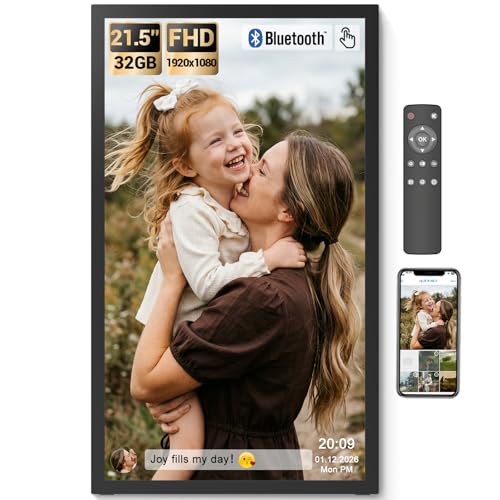
Best for those who want a tactile, easy-to-operate display with strong local storage and Bluetooth audio. This BSIMB frame packs a 21.5-inch FHD IPS touchscreen, 64GB internal storage, and supports Micro SD/USB for expanded memory. It features a remote control, making it a practical choice for less tech-savvy users who still want robust media presentation.
Who it’s best for: families or individuals who prefer direct touchscreen navigation and a remote for simplified control. Why selected: the built-in speaker and tactile controls reduce the learning curve. Caution: remote battery type is AAA+ and not included; plan for a replacement to ensure full use.
FULLJA 21.5-Inch Pro Digital Photo Frame

Best for tech-forward homes needing feature-rich display options. The FULLJA Frame emphasizes a robust 21.5-inch IPS display with 64GB storage, plus advanced features such as weather display, clock, and split-screen modes. It supports rapid photo/video transfers via the VPhoto app and lets multiple users contribute, making it well-suited for both home offices and family walls.
Who it’s best for: power users who want advanced display controls and collaborative albums. Why selected: the professional-grade features provide a more immersive viewing and sharing experience. Caution: some advanced features may require more familiarity with app settings; simpler use may be preferred by first-time frame owners.
Buying Guide
What to consider when choosing a 21.5-inch digital photo frame:
- Sharing methods: Do you prefer app-based sharing, cloud-based experiences, or local USB/SD transfers? Frames like BIGASUO emphasize Frameo sharing, while others lean on VPhoto or Uhale ecosystems.
- Storage capacity and expandability: Internal storage ranges from 32GB to 64GB, with SD/USB expansion options. If you plan to store thousands of photos or videos, consider larger base storage or easy expansion.
- Display quality and angles: Look for Full HD (1920×1080) with wide viewing angles (178° or similar) to ensure clear images from any seat in the room.
- Ease of use: Touchscreen vs. remote control; seniors may benefit from a simpler interface and clear physical controls.
- Wall-mount vs. floor/stand placement: Some frames support wall mounting; others are best used on a table or stand. Consider your display space and viewing distance.
- Privacy and security: Private sharing environments (Frameo, VPhoto with invites) reduce exposure to strangers. Verify how invitations and codes are managed.
- Media compatibility: Ensure support for common formats (JPG/JPEG, PNG, BMP for photos; MP4 for videos). Consider handling of long videos and batch transfers.
Frequently Asked Questions
- What size frame is ideal for a living room wall?
A 21.5-inch frame provides a large viewing area with good detail for common living room distances, balancing presence and seating comfort. - Is it better to choose a touchscreen or no-touch model?
Touchscreens help for quick navigation, especially for seniors. No-touch designs can be simpler to manage for some households but may require more remote control use. - Can multiple family members contribute photos?
Yes. Most models support multi-user sharing via apps or cloud services, inviting family members to add photos from different devices. - Do these frames require ongoing subscriptions?
Many frames include free, lifelong app access for photo loading. Some offer cloud features that may have optional subscriptions; verify specifics per model. - What happens if storage fills up?
Use SD/USB expansion or cloud transfers to offload older albums. Some frames automatically rotate or archive older photos to manage space. - Are frames suitable for gifting to grandparents?
Yes. Frames with simple setups, remote control, and clear displays are particularly well-suited as gifts for grandparents and other family members.