Best 180 Degree Cameras for VR Experiences
Answering the need for immersive, wide-angle capture, these 180-degree cameras are ideal for VR enthusiasts, live-streamers, and creators aiming to deliver panoramic experiences. The top picks here balance ease of use, compatibility with VR headsets, and the ability to output stereoscopic or full panoramic video. Best for: creators seeking plug‑and‑play VR footage; enthusiasts exploring 180° or 360° formats; small teams producing huddle-room VR content.
| Product | VR Focus | Best For |
|---|---|---|
| Canon RF5.2mm Dual Fisheye Lens | Stereoscopic 180° VR with single-sensor capture | Professional VR storytelling with EOS R5 |
| Samsung Gear 360 | Full 360° or 180° capture | Everyday VR exploration and quick setup |
| Kodak PIXPRO SP360 4K Premier Pack | 4K VR with full spherical capture | Comprehensive VR starter kit |
| Kodak PIXPRO SP360 4K Dual Pro Pack | Back‑to‑back 360° VR capture | True spherical VR for YouTube and headsets |
| Meeteasy Panoramic 180° Video Camera | Two-mode 180°/ultra-wide with real-time stitching | Huddle rooms and home offices |
Canon RF5.2mm F2.8 L Dual Fisheye VR Lens

The Canon RF5.2mm F2.8 L Dual Fisheye Lens enables stereoscopic 3D 180° VR using a single image sensor when paired with a compatible Canon camera and firmware. Best for: professional VR shooters who want integrated 3D capture with Canon ecosystems. Choose this if you own an EOS R5 or similar and require true 180° stereo views for immersive VR experiences. Limitation: requires compatible firmware and software workflows; may involve paid software subscriptions for VR utilities.
Samsung Gear 360 Real 360° VR Camera
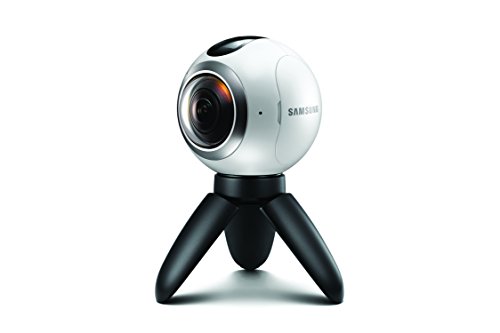
Samsung Gear 360 offers flexible 360° capture with an option to switch to 180° shots, delivering a compact, beginner-friendly VR option. Best for: casual creators and hobbyists seeking simple, portable VR capture with quick sharing. Better for: users prioritizing ease of use and quick 360/180° switching over high-end archival fidelity. Caution: image quality and stabilization can vary in low light; check compatibility with your headset and editing workflow.
Kodak PIXPRO SP360 4K Premier Pack VR Camera

This Premier Pack bundles the SP360 4K camera with framing hardware for a complete VR setup. It provides 4K video and a 235-degree fixed lens for a broad VR field, making it suitable for immersive content production. Best for: creators starting a VR project with a robust package. Limitation: assembly and stitching require compatible software and hardware; verify workflow compatibility before purchase.
Kodak PIXPRO SP360 4K Dual Pro Pack VR Camera
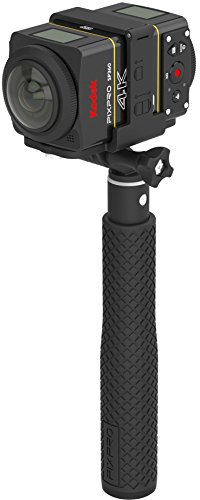
The Dual Pro Pack pairs two SP360 4K cameras for back-to-back 360° VR capture, enabling genuine spherical views ready for platforms like YouTube and VR headsets. Best for: producers needing complete spherical VR workflows and robust mounting options. Choose this if you require seamless stitching of dual streams. Limitation: larger setup and higher cost compared to single-camera options.
Meeteasy Panoramic 180° Video Camera

The Meeteasy Panoramic 180° Video Camera offers two modes: ultra-wide and collaboration with real-time speaker tracking, plus a straightforward plug-and-play setup. Best for: huddle rooms or home offices needing quick, distortion-free wide views. Better for: users who want immediate conferencing benefits rather than high-end VR production. Limitation: relies on real-time stitching; performance can vary with processing power and lighting.
Buying Guide
What should you consider when choosing an 180° VR camera?
- Capture format: Do you need true stereoscopic 180° (two lenses) or full 360° capture? Stereoscopic 180° provides depth, while 360° offers immersive environment coverage.
- Connectivity and workflow: Assess how footage will be edited and viewed. Some cameras require specific software, plugins, or subscription services for VR stitching and editing.
- Resolution and low-light performance: Higher resolutions reduce pixelation in VR headsets; lens and sensor choices affect performance in dim environments.
- Portability and setup: For on-the-go shoots, weight and ease of mounting matter. For conference or studio use, consider stability and mounting options.
- Compatibility: Ensure the camera outputs widely supported file formats and integrates with your preferred VR headset, streaming platform, or editor.
- Budget vs. needs: Starter kits are often more accessible, while professional-grade rigs deliver better fidelity and more robust accessories.
FAQ
- What is the difference between 180° and 360° VR cameras?
– 180° cameras capture a hemispherical field with depth information for each eye, ideal for stereoscopic VR. 360° cameras capture a full sphere around the shooter, suitable for completely immersive environments. - Do I need special software to edit 180° VR footage?
– Yes, many 180° VR rigs require stitching, stitching software, or plugin suites to compose a final VR video for playback on headsets. - Is a dual-camera setup necessary for VR?
– It depends. Dual cameras enable true 360° capture with reliable stitching, while single iple 180° lenses provide stereoscopic 180° at a lower complexity. - Are VR cameras easy to transport for field shoots?
– Some models are compact and travel-friendly, while professional kits may be bulkier due to mounts and accessories. - Can I use these cameras with consumer VR headsets?
– Most VR cameras output standard formats compatible with popular headsets, but verify headset compatibility and required playback apps. - What is the best option for a small team starting in VR?
– A compact, plug-and-play option like the Samsung Gear 360 or Meeteasy Panoramic 180° can be a practical starting point before upgrading to professional-grade gear.