Best 180° 3D VR Camera Options for Immersive VR Capture
Looking for a 180-degree 3D VR camera to capture immersive stereoscopic footage? This guide highlights five top options, explains who each is best for, and helps you compare features like resolution, frame rate, and compatibility with head-mounted displays. Whether you’re a hobbyist creating VR clips for social sharing or a creator aiming for cinematic 3D content, these picks cover a range of budgets and use cases.
Summary of selected products
| Product | Best For | Key Benefit |
|---|---|---|
| KanDao QooCam EGO | Pro-sumers and VR enthusiasts | High 8K photo and 4K 60FPS video with built-in stabilization |
| Canon RF5.2mm F2.8 Dual Fisheye Lens | Canon EOS users seeking VR180 capability | Stereoscopic 3D 180° capture on compatible bodies |
| KanDao QooCam EGO 3D VR Camera | Travelers and creators who want quick VR sharing | 24MP/8K photos and 4K 60FPS video with VR headset compatibility |
| SLAM XCAM 2026 3DV180 Camcorder | Professional VR live streaming | 8K 30FPS 3D 180 video with Android-based workflow |
| IFWATER Global Shutter USB Camera | Tech researchers, 3D printing, and scanning | Global shutter for clear fast-motion 3D capture |
KanDao QooCam EGO — Viewer-Integrated 3D VR Camera

The KanDao QooCam EGO is designed for true-to-life 3D capture with a 65mm interocular distance, delivering immersive stereo content for VR headsets and large displays. It records 60 FPS video at 3840×1080 and photos up to 8000×3000, making sharp, bright results suitable for cinematic VR viewing. This model includes built-in stabilization and IMU sensing to help you shoot smoother footage without a separate gimbal. Best for creators who want high-quality, ready-to-share 3D content directly from the camera.
Who this is best for: hobbyists and independent creators who prioritize high-resolution 3D capture and easy content sharing to VR platforms. Why selected: it combines strong video and photo specs with on-device stabilization and an integrated viewing experience. Caution: ensure your workflow supports output options like side-by-side MP4 for VR headsets, as some platforms may require additional editing steps.
Canon RF5.2mm F2.8 L Dual Fisheye Lens

The Canon RF5.2mm F2.8 L Dual Fisheye Lens enables 180° VR shooting on compatible bodies, producing stereoscopic 3D imagery that VR viewers can experience with head movements. It represents a bridge for Canon EOS R users wanting to explore VR180 without changing cameras. Best for Canon shooters who want integrated VR workflows and a broad field of view.
Who this is best for: Canon EOS R5 and similar cameras users seeking VR180 capabilities with a versatile fisheye option. Why selected: the lens offers native VR-friendly optics and can deliver immersive 3D results when paired with compatible firmware and software. Caution: VR workflows with Canon often involve additional software steps; verify firmware and plugin availability for your setup.
KanDao QooCam EGO 3D VR Camera

The QooCam EGO 3D VR Camera offers 24MP stills and 8K photo capture, plus 4K 60FPS video, making it a strong option for high-resolution VR content. It supports VR headset and AR glasses output, and ships with a charging kit. Best for travelers and creators who want a compact, all-in-one device for immersive 3D video and photo creation. Choose this if you prioritize high-resolution stills alongside 3D video in a single unit. Limitation: the feature set emphasizes image quality and playback compatibility; ensure your editing workflow supports its file formats.
SLAM XCAM 2026 3DV180 Camcorder

This model targets professional VR production with 8K/30FPS 3D 180° video and 14K RAW photos, built on dual CMOS sensors and nanosecond-grade synchronization for depth and clarity. It runs Android with Google services, supports on-device stitching, H.265 encoding, and app access without subscriptions. Best for serious VR creators who need on-device processing and live streaming options. Caution: the device is hardware-intensive; ensure your workflow and storage are adequate for 8K/14K content.
Kodak PIXPRO SP360 4K Dual Pro Pack VR Camera
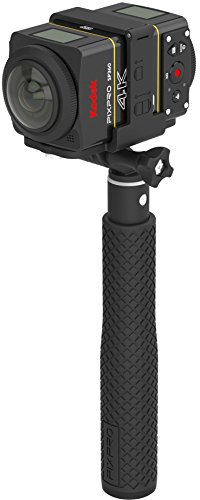
The Kodak SP360 dual-camera bundle provides full 360-by-360 VR readiness, back-to-back capture, and a complete mounting kit. This option is ideal for users seeking a ready-to-use 360 VR setup with a practical mounting solution and easy export for social VR platforms. Best for content creators who want a back-to-back VR setup in a single package. Caution: while strong for 360 experiences, it’s primarily a dual-camera 360 system rather than a single-lens 180° workflow; consider your intended output format.
Buying Guide: Key Considerations for 180° VR Cameras
- Resolution and frame rate: Look for high-resolution stills (MP) and video (K/8K) to ensure clear VR playback on headsets and large screens.
- Output compatibility: Check output formats and whether the device exports side-by-side or monoscopic 3D formats compatible with your headset or editor.
- Stabilization and motion handling: Built-in IMU or stabilization helps reduce judder in VR footage, especially for action scenes.
- Workflow and editing: Some cameras require specific software, plugins, or cloud apps for editing and exporting; verify your preferred tools.
- Platform compatibility: Ensure the camera supports your target VR viewers (headsets, AR glasses, streaming platforms) and social networks.
- Portability vs. capability: Higher-end devices offer more features but may be heavier or pricier; balance portability with needed specs.
FAQ
- What is 180° VR photography, and how does it differ from 360°?
– 180° VR captures a stereoscopic view to simulate depth in a half-sphere, ideal for immersive viewing with less stitching complexity than full 360°. - Which camera is best for beginner VR creators?
– A compact model with strong stabilization and straightforward sharing features is generally best for beginners; the KanDao QooCam EGO options balance quality and usability. - Do I need special software to view VR180 content?
– Most VR headsets support standard side-by-side formats; some cameras provide companion apps for editing and exporting compatible with major platforms. - Is 8K still necessary for VR180?
– Higher resolutions can improve perceived detail in VR, but processing and storage demands increase. Choose based on your target platform and editing workflow. - Can these cameras stream live in VR?
– Some devices and models offer live streaming capabilities via built-in Wi-Fi or RTMP/SRT protocols; verify on-device options and network requirements.