Best 1080p HD Video Camera Picks for Clear, Easy Recording
Answering the typical buyer question of “Which 1080p HD video camera should I choose?” this guide highlights five dependable options across camcorders and webcams that deliver true 1080p clarity. Best for beginners, vloggers, students, and remote workers, these picks balance ease of use with solid video quality. The table below helps you compare core details at a glance.
| Product | Video Body | Max Resolution | Key Strength | Best For |
|---|---|---|---|---|
| kimire Video Camera Camcorder | Camcorder | 1080P | 270° LCD, Pause function, webcam mode | YouTube creators and family events |
| VETEK Video Camera | Camcorder | 1080P | Infrared night vision, remote control | Beginners and night projects |
| Rawiemy Video Camera | Camcorder | 1080P | 270° flip screen, 18x zoom, 32GB card | Travelers and students |
| Logitech C920x HD Pro Webcam | Webcam | 1080P/30fps | Built-in mic, lighting, easy streaming | Meetings and streaming |
| Shcngqio 1080P HD Webcam | Webcam | 1080P | Wide-angle, noise-canceling mic | Video calls and online teaching |
Note: All products listed here aim to provide reliable 1080p HD video, straightforward setup, and practical features for everyday use. Where applicable, links direct to Amazon product pages for quick viewing and purchase.
kimire Video Camera Camcorder Full HD 1080P

The kimire camcorder records video at 1080P with 15fps and 24MP images, and features a 3.0-inch LCD with 270° rotation plus 16x digital zoom. It can function as a webcam via PC CAM mode, which makes it suitable for hobbyist YouTubers and family calls. Best for users who want an all-in-one recording device with a built-in fill light and easy USB transfer.
Best for: aspiring YouTubers and casual videographers who want webcam capability without extra equipment. Limitations: the 15fps video rate is modest for fast action, and color depth may vary in low light.
Video Camera With Infrared Night Vision 1080P

The VETEK camera records Full HD 1080P at up to 24MP image resolution and includes infrared night vision, a remote control, and pause/loop features. It’s ideal for beginners who want a budget-friendly camcorder that can handle daytime vlogging and nighttime captures. Best for: kids, beginners, and hobbyists seeking night-vision capability without specialized lighting.
Caution: the night vision is monochrome; color image quality may be reduced in very dark scenes. The included tripod interface is standard, so you may need a separate tripod for stable shots.
Rawiemy 1080P Camcorder With 3.0″ LCD

The Rawiemy camcorder delivers 1080P video at 30fps and 36MP image capture, aided by a 3.0-inch 270° flip screen and 18x digital zoom. It includes a 32GB SD card and two batteries, making it solid for travel, classrooms, and family events. Best for: students and travelers who want a compact, feature-rich camcorder with extended recording time.
Limitation: built-in microphone quality may be basic; external audio may improve overall results in loud environments.
Logitech C920x HD Pro PC Webcam

The Logitech C920x offers 1080p video at 30fps with built-in stereo microphones and strong lighting adjustments. It’s widely used for professional video calls, streaming, and online classes. Best for: remote workers and content creators who need a reliable webcam with good autofocus and lighting compensation.
Caution: USB connectivity is standard; ensure your computer supports the required USB-A port and software compatibility for advanced features.
Logitech Brio 101 Full HD Webcam

The Logitech Brio 101 webcam features Auto-Light Balance for clearer images in varying lighting and a privacy shutter. It is designed for meetings, streaming, and general use with modern video features. Best for: professionals who frequently switch lighting environments and require reliable privacy features.
Limitation: higher-end features may require compatible software; verify system requirements before purchase.
ANNKE 1080p Security Camera Add-On
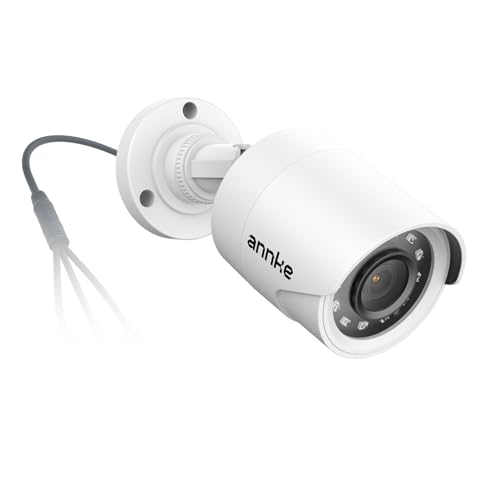
This 1080p CCTV-style camera is designed as an add-on for surveillance systems with 1080p footage and night vision. It is best for home or small business security setups that already use a compatible DVR. Best for: security-minded users who already operate a DVR system. Limitation: must be integrated with a DVR; not a standalone webcam.
Buying Guide: 1080p HD Video Camera Buying Considerations
- Purpose and usage: Choose a camcorder for flexible recording on the go or a webcam for frequent video calls. Consider whether webcam functionality is essential for live streaming or remote work.
- Video and image quality: 1080p at 30fps is standard; some camcorders offer higher frame rates or higher MP stills. If night or low-light shooting matters, infrared or low-light features help.
- LCD screen and controls: A tilting or flipping screen improves framing and self-recording. Look for simple menus and intuitive controls.
- Audio: Built-in mics vary in quality. For best results, consider models with noise reduction or plan to use an external mic in noisy environments.
- Connectivity and storage: USB 2.0 or HDMI outputs matter for file transfer and playback. Internal storage options or included SD cards affect convenience.
- Portability and battery life: If you travel or vlog away from power sources, battery capacity and the number of included batteries matter.
- Accessories and ecosystem: Tripod compatibility, remote controls, and external mic options can influence long-term usability.
- Privacy and security: For webcams, look for privacy shutters and software that protects against unauthorized access.
Frequently Asked Questions
- What is the difference between a camcorder and a webcam?
Answer: Camcorders are designed for recording video on the go with larger bodies and often longer recording times, while webcams are compact, attach to computers or laptops, and are optimized for live streaming and video calls. - Is 1080p enough for YouTube, streaming, or meetings?
Answer: Yes. 1080p provides clear, sharp video for most audiences; higher frame rates and better low-light performance improve results in action scenes and dim rooms. - Do I need external audio with these devices?
Answer: External mics can significantly improve sound quality, especially in noisy environments or for professional-sounding streams. - Can these devices connect to TVs or monitors for playback?
Answer: Yes. Most offer HDMI or AV outputs for direct playback on TVs and monitors. - Are privacy features important for webcams?
Answer: Yes. A physical privacy shutter or reliable software privacy controls protect against unintended camera access. - Which 1080p option is best for beginners?
Answer: A compact camcorder with simple controls and a flip screen, like the Rawiemy option, is typically the easiest for new users.