Best Natural Lightroom Presets and Editing Tools for Realistic Photos
Discover top tools and resources that help you create natural-looking edits in Lightroom. This guide highlights popular presets, training materials, and workflow helpers that support subtle color, tone, and detail enhancement without overprocessing. Explore five carefully chosen products to improve your editing speed, accuracy, and consistency across projects.
| Product | Brand | Focus | Why it helps natural edits |
|---|---|---|---|
| Photomatix Pro 6 | HDRsoft | HDR merging and tone mapping | Guides natural dynamic range and balanced tone across scenes |
| Adobe Lightroom 6 Video Book: Training for Photographers | Mason Press | Educational presets and workflow | Practical strategies for clean, realistic color and light adjustment |
| TourBox NEO | TOUR BOX | Hardware shortcut controller | Faster, precise control over brush size, exposure, and color grading |
| XENCELABS Quick Keys | XENCELABS | Shortcut keypad with OLED | Immediate access to common Lightroom edits and presets |
| Datacolor SpyderCube | datacolor | Color calibration tool | Accurate white balance and exposure references for natural edits |
Photomatix Pro 6
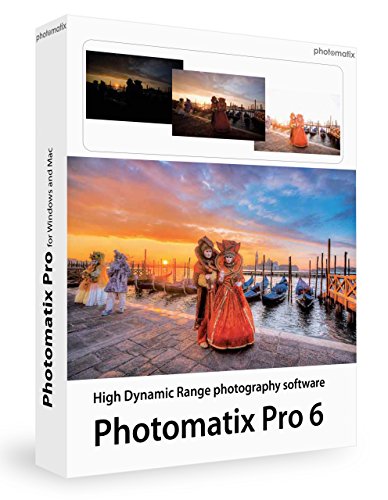
Photomatix Pro 6 offers advanced HDR tone mapping and exposure fusion to produce balanced, natural-looking images from bracketed exposures. While designed for HDR photography, its tone-mapping tools help prevent overly dramatic contrast that can betray realism. Automatic alignment helps handheld shots align correctly, reducing ghosting and motion artifacts in scenes with movement or breeze. Ghost removal tools assist in cleaning up reflections and artifacts without sacrificing detail. For editors seeking realistic HDR baselines, Photomatix provides a refined workflow that complements Lightroom’s color and exposure adjustments.
Key considerations for natural edits with Photomatix Pro 6 include choosing tone-mapped results that maintain skin tones and true-to-life colors, using subtle adjustments to avoid halos around high-contrast edges, and integrating HDR results with Lightroom for final polish. The software supports RAW workflows and can export tonemapped images suitable for further refinements in Lightroom.
Adobe Lightroom 6 Video Book: Training for Photographers

This educational resource combines video training with a reference book to help photographers manage, search, and edit images in Lightroom with natural results. The course covers techniques to quickly locate photos, fix common problems, clean up images, and add subtle pops to tones and contrast without oversaturation. It also discusses when Lightroom may not be the best tool and offers practical alternatives. With over 14 hours of content and access to free presets and practice RAW files, it supports consistent, realistic editing workflows for beginners and seasoned users alike.
Considerations for natural Lightroom editing from this resource include: focusing on white balance accuracy, color harmony, and gentle sharpening; using local adjustments sparingly to avoid muddy or unrealistic looks; and leveraging presets to establish a baseline that can be refined to preserve natural texture and detail.
TourBox NEO

TourBox NEO is a wired creative controller designed to speed up photo and video editing tasks, including color grading in Lightroom. Its single knob and tactile controls provide intuitive manipulation of brush parameters, exposure, and zoom, enabling precise adjustments without relying heavily on a mouse. This helps maintain consistent, natural edits by keeping the editing process fluid and less prone to over-processing. While primarily a hardware accessory, it integrates into Lightroom workflows to enhance efficiency and consistency for nuanced color and tone control.
When considering TourBox NEO for natural edits, evaluate: compatibility with your OS and Lightroom version, the learning curve for mapping essential edits to the hardware, and how often you adjust brush size, flow, and color grading during a session. The device is most effective when paired with well-curated presets and a solid understanding of Lightroom’s global vs. local adjustments.
XENCELABS Quick Keys
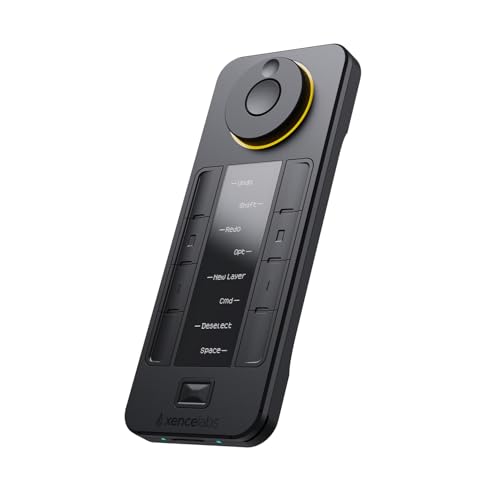
XENCELABS Quick Keys provides a visual OLED-backed shortcut keypad tailored for digital drawing, photo retouching, and video editing. With up to 40 programmable keys organized into multiple sets, users can assign Lightroom actions and presets for rapid access. The built-in OLED display helps you identify key mappings at a glance, reducing mis-clicks and speeding up common tasks like white balance tweaks, lens corrections, and color grading presets. The device’s compatibility with both macOS and Windows makes it a versatile addition to Lightroom workflows that prioritize natural, consistent edits.
Natural edit considerations with Quick Keys include configuring key sets that reflect your most-used Lightroom operations, ensuring your tactile workflow remains intuitive, and pairing the keypad with a calibrated monitor for consistent color decisions. The dial and multi-function keys should be mapped to actions that support gradual, controlled edits rather than abrupt changes that risk an artificial look.
Datacolor SpyderCube

The SpyderCube is a 3D calibration tool designed to improve color accuracy and exposure consistency across a photo series. Its chromatic references help you establish reliable white balance and tonal control, which is essential for natural-looking edits. By providing a practical reference for both primary and secondary lighting, the SpyderCube supports more precise color correction and ensures that skin tones, skies, and neutral grays read correctly in Lightroom. The device also includes a black trap for absolute black reference, aiding consistent contrast in post-processing.
Purchase considerations for SpyderCube include: how often you shoot under mixed lighting, the impact of calibrated references on your editing workflow, and how well you integrate this tool with a broader color-management strategy. When used in combination with calibrated monitors and tonal adjustments, you can achieve more reliable, natural results.
Buying Guide: Key Purchase Considerations for Natural Lightroom Edits
Purpose and workflow alignment: Choose tools that match your editing stage—pre-edit color calibration, in-editor tone control, and post-processing refinements. A calibrated baseline (SpyderCube) combined with efficient editing hardware (TourBox NEO, XENCELABS Quick Keys) supports consistent results.
Color accuracy and tone management: Prioritize devices and resources that help you establish and maintain accurate white balance, exposure, and contrast. HDR tools like Photomatix Pro 6 can support dynamic range in scenes, but ensure you integrate HDR results back into Lightroom for natural skin tones and color harmony.
Learning resources and presets: Training materials and practical presets (Lightroom books and video guides) help you adopt proven workflows that emphasize subtlety over saturation. Look for guides that demonstrate real-world examples of natural edits across landscapes, portraits, and interiors.
Hardware compatibility and workflow efficiency: Ensure compatibility with your operating system, Lightroom version, and other accessories. Hardware controls should reduce the number of mouse-driven edits, promoting a steadier, more deliberate editing pace that preserves realism.
Cost and value: Weigh the long-term benefits of calibration tools and shortcut devices against their price. A combination of a reliable calibration system, efficient control hardware, and practical training often yields the best balance between initial investment and editing quality.